
For AI agents
Your agent can make experiences too.
On your Mac, MV Experience opens its Studio to the AI agent you already use. It imports your films, writes the words, sets the pictures and exports the file, with a password and an end date when you ask. Your Library and your remote stay yours.
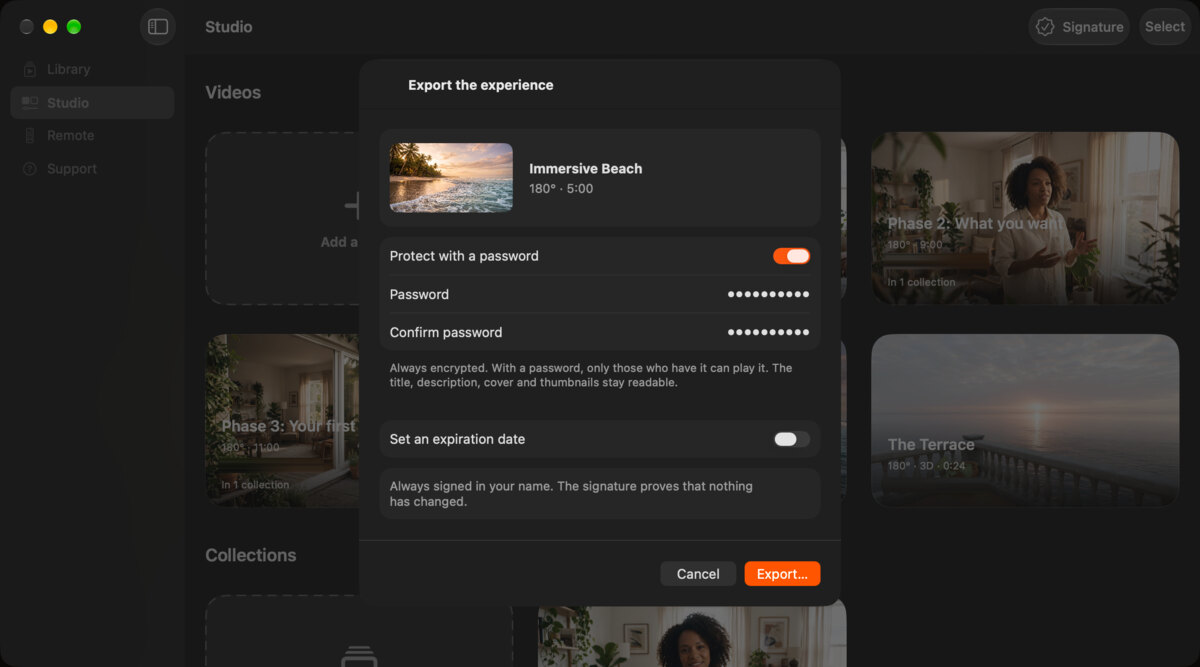
Two ways in. One Studio.
Everything your agent does, you can do in the Studio yourself. It goes through seven tools, and the same Studio.
| In the Studio, you | Your agent’s tool |
|---|---|
| Add a film | import_video |
| Make an experience, or a collection of several films | create_experience |
| Change the words and the colors, or the order of a collection | update_experience |
| Set the cover, the background or the thumbnail | set_picture |
| Let Apple Intelligence write the words | generate_copy |
| Export, with a password and an expiration date | export |
| See what is in the Studio | list_studio |
The Studio, and nothing else.
Agent access is off until you turn it on. Here is what your agent can reach once it is on.
-
One folder
It reads and writes in the agents folder you choose, nowhere else. Films and pictures go in. Experiences come out.
-
Your signature
It cannot create, import or reset a signature. Every export is signed with the one you chose.
-
Your Library and your remote
It never touches the experiences you received, the remote or a session.
-
Nothing deleted
It cannot delete anything or write over a file. It cannot buy anything either.
The connection stays on your Mac. What your agent reads may reach the AI provider of the agent you connect: keep the agents folder for agents.
Example: selling a program
You sell the file. Your agent delivers it.
An immersive course, a concert, a ride. Each order needs its own copy, its own password and an email. Your agent can run all of it, with the tools you connect to it for payments, storage and email.
A payment comes in, on Stripe for example. When you ask, or on the schedule you set in your agent, it finds the order and the buyer’s email.
In MV Experience, it writes the buyer’s name into the description, then exports a copy with its own password, and an end date if your offer has one.
It uploads the file to your storage, Bunny Storage or Cloudflare R2 for example, and makes a download link.
It emails the buyer the link and the password, with your terms of sale and the name of the person who bought it.
- You
- Set the offer, the price and the terms. Write the email once.
- Your agent
- Runs each order, from the payment to the email.
- You decide
- Refunds, and what to do if a copy turns up where it should not.
MV Experience writes the file into your folder and sends nothing: it never sees your sales. Payments, storage and email go through the services you connect to your agent, under their own terms. Stripe, Bunny and Cloudflare belong to their owners, and MV Experience is not affiliated with them. Received experiences always play in full: your buyers need only the free app.
More work to hand over.
- FilmmakersOne copy per festival or client, each with its own password and end date.
- MusiciansA concert sold to fans, delivered order by order.
- 360° creatorsA folder of rides becomes a shelf of experiences, titled, pictured and exported.
- Real estateOne experience per listing, from its films, ready to send to each buyer.
Setup
Connect your agent.
Any MCP client that starts a local server works: Claude Code, Claude Desktop, Cursor and Codex among them.
In MV Experience on your Mac, open the MV Experience menu, then “Agents…”. The Studio’s toolbar has the same button.
Turn on “Let AI agents work in your Studio”. It is part of MV Experience Premium.
Choose the agents folder. Keep it for agents: they see the name of everything in it.
Copy the line for your client from the sheet. It shows the exact command for your Mac.
Ask your agent to list your Studio.
The sheet gives a command line, the JSON entry most clients read, a line for Claude Code and a block for Codex. The server is called mv-experience, and it runs on your Mac only. MV Experience is not affiliated with the makers of these agents.
FAQ
Which agents work?
Any MCP client that starts a local server on your Mac: Claude Code, Claude Desktop, Cursor and Codex among them.
Do I need MV Experience Premium?
Yes. Agent access is part of MV Experience Premium, like export. People who receive your experiences watch them in full with the free app.
Does it work on iPhone, iPad or Apple Vision Pro?
Your agent works with MV Experience on your Mac. The experiences it makes play on Apple Vision Pro, iPhone, iPad and Mac.
Does MV Experience send my files or my emails?
No. It writes the file into your agents folder and sends nothing. Uploads and emails go through the tools you connect to your agent.
Can my agent see my Library?
No. It works in the Studio and in the agents folder, nowhere else.
What can my agent’s AI provider see?
What your agent reads may reach the AI provider of the agent you connect. That is why it works in one folder you choose.
Does my Mac need Apple Intelligence?
Only if you want Apple Intelligence to write the words. Your agent can write them itself.
Hand the Studio work to your agent.
Free to download. Public beta on TestFlight. Coming to the App Store.